Data Lineage
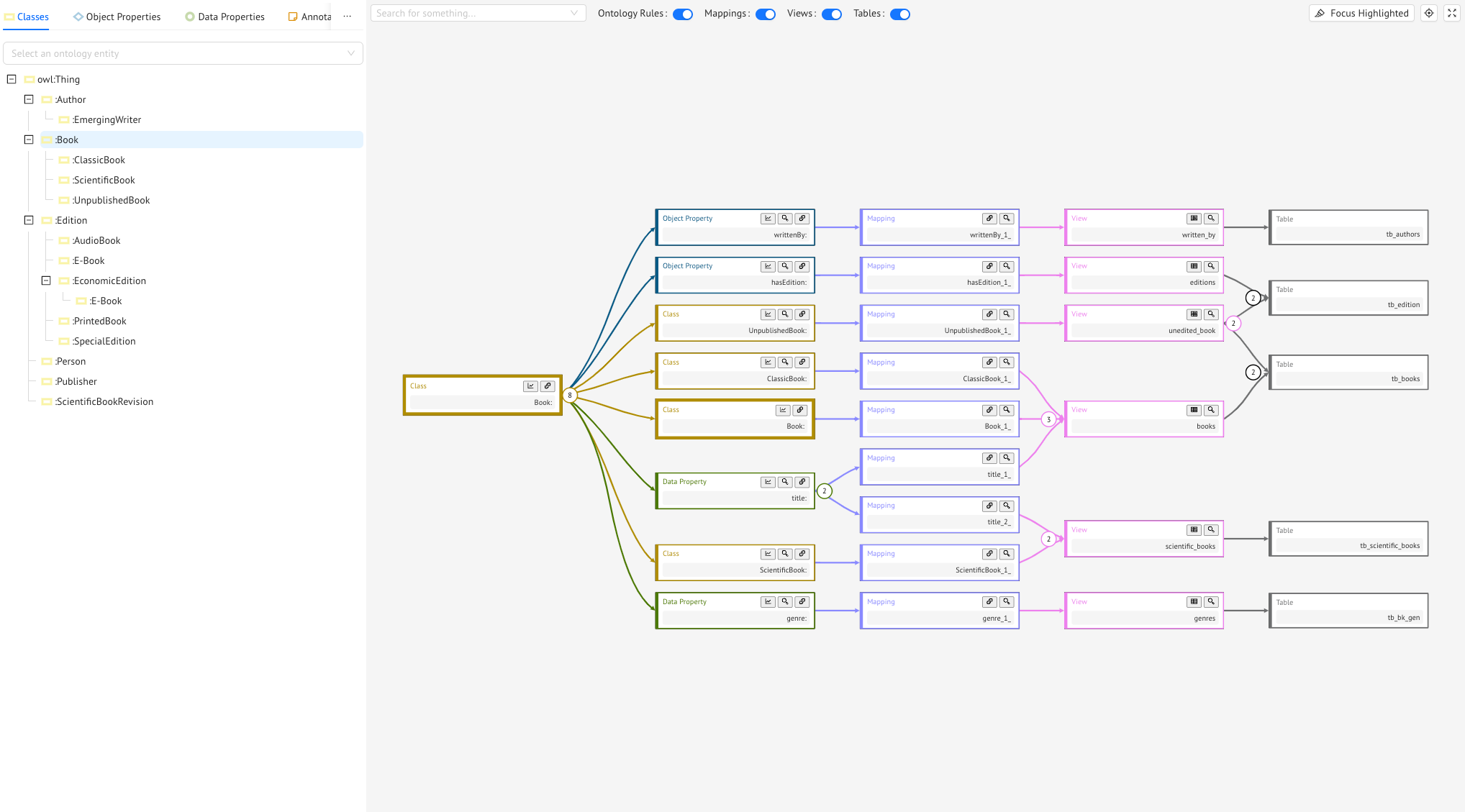
This section wants to help the user understanding the provenence of data when a certain entity is asked. Because of the reasoning services provided by the Mastro reasoner it is not always straightforward understand this flow.
On the leftside of the section you can select an entity from the ontology tree: this will be the focusing of the graph of the Data lineage. From this root entity you will identify four horizontal layers of nodes which can be filtered with the buttons on top. These layers represent:
- The Ontology Rules: these layer shows the reasoning progress delivered by Mastro. Every time the root entity is mentioned in a query, there will be considered also the entities of this layer. This happens because the ontology claim some rules that makes this assumption safe: to take every instance of the root entity you should ask for these other entieties too. You can notice that the root entity appears in this layer (thicker border).
- The Mappings: these layer has a block for each mapping considering the entities of the second layer
- The Views: these layer has a block for each SQL View used in the mappings in a
joinoperation - The Tables: these layer has a block for each relational table involved in the SQL views
The arrows link the corresponding blocks and there is a counter for numbering the incoming/outgoing arrows.
By clicking on a specific block it will be highlighted one or more path(s) from the entity root to the table(s) that involve(s) the clicked block.
Once a path is highlighted by clicking Focus Highlighted all the blocks will be rearranged to allow the focusing on the paths. To reset the initial arrangment just click on the root entity.
Data Lineage Blocks
Each block type can be identified by a color (yellow for the ontology Classes, blue for the ontology Object Properties, green for the ontology Data Properties, dark Blue for the mappings, purple for the SQL Views, gray for the Tables) and has several buttons for each type.
Data Lineage Entities

These buttons achieve the following functionalities:
- Show the Data Lineage for this entity: this entity will become the root entity
- Explaination: it will show the OWL 2 axiom used by the Mastro reasoner for the implying of this entity with respect to the root entity
- Link to the Mappings page of this entity
Data Lineage Mappings

These buttons achieve the following functionalities:
- Link to the page of the Mapping
- Show SQL query of the mapping
Data Lineage SQL Views

These buttons achieve the following functionalities:
- Link to the page of the SQL View
- Show SQL query of the SQL View
Previous Next