SQL Views
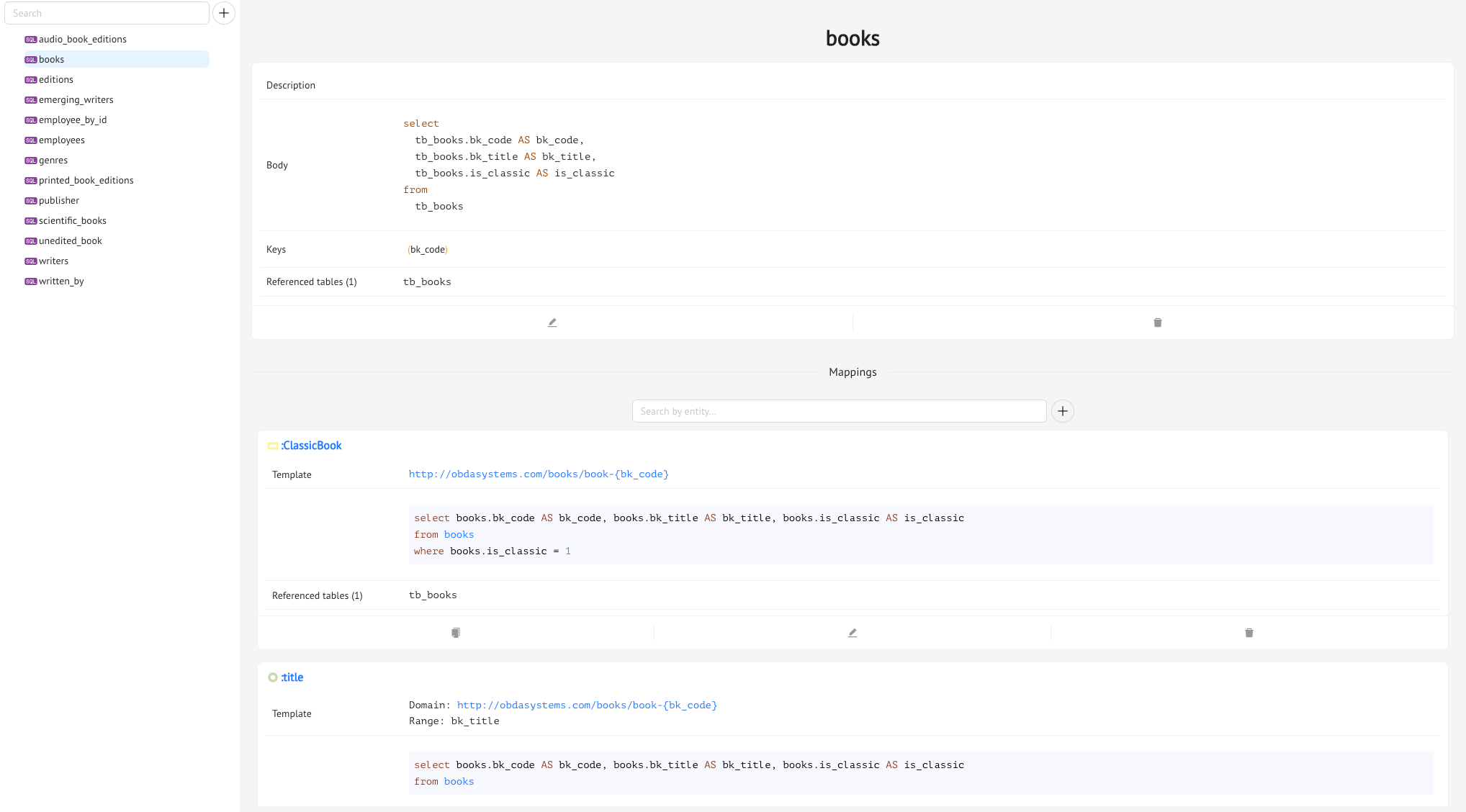
An SQL View is an SQL query over the database, to which you can assign a name. From the SQL Views tab, choose the view called books, and you’ll see that it has this SQL query:
select
  tb_books.bk_code AS bk_code,
  tb_books.bk_title AS bk_title,
  tb_books.is_classic AS is_classic
from
  tb_books
Indeed, the table in the Books database that contains the IDs, titles, and types of the books is called tb_books, and looks like this:
| bk_code | bk_title | is_classic |
| 1 | Resonance | 0 |
| 2 | As we Grieve | 0 |
| 3 | Runaway Storm | 0 |
| 4 | Neverland | 1 |
| 5 | Eight Days to Live | 0 |
| 6 | Scandal on Rincon Hill | 1 |
| 7 | Amberville | 0 |
| 8 | Some Like it Rough | 0 |
| 9 | Zinn for Beginners | 1 |
| 10 | Here Burns My Candle | 0 |
As you can see, the is_classic column contains the type of the book. So 1 for the classics and 0 otherwise. So with the books view, we are extracting all the information that’s in the tb_books table. We’re going to use this information to create the instances of the :Books class, and also of its subclasses, like :ClassicBook, by using this SQL View in the mappings of these classes.
From this tab, you can also see which Ontology Mappings are using the chosen SQL View, from the Mappings section, and also which SQL View Constraints this view is involved in.
Keys
Similarly to what happens in relational databases, it is possible to define Keys for SQL Views. Think of Keys as primary keys in a relational table: they uniquely identify each row in that view. You’ll see that in the books view, code is the key. Keep in mind that it’s possible to define more than one key, each having more than one parameter.
Keys are shown both in the detail of the SQL View for which they are defined, and in the dedicated Keys tab in the SQL View Constraints tab of the Mappings module.
Let’s see how Keys can help Mastro improve its query answering process through an example.
Example. Assume that you have defined the following SQL View: territory_view(city, province, region), with a Key on the column city
which you use twice to map the object property :partOf with the following templates:
Mapping 1:
- Domain:
http://testexample.com/city - Range:
http://testexample.com/province
Mapping 2:
- Domain:
http://testexample.com/province - Range:
http://testexample.com/region
Now, you ask the following SPARQL query:
SELECT ?x ?y ?z
WHERE {
  ?x :partOf ?y.
  ?y :partOf ?z.
}
which we can rewrite, using a more compact logic-based notation, as:
{x,y,z | :partOf(x,y), partOf(x,z)}
The Mapping Rewriting step of the query answering process will produce the following rewriting:
{x,y,z | territory_view(x,y,z'), territory_view(x,y',z)}
However, this rewriting, thanks to the Key on column city (the x), can be simplified into:
{x,y,z | territory_view{x,y,z}
Thus avoiding a useless self-join.
Creating an SQL View
Let’s start with creating a new SQL View. Go the SQL Views tab, press the + button near the search bar, and you will see the SQL View editing drawer pop out. Let’s try creating a view that extracts information regarding book editions from the database.
The table in the Books database which contains this information is called tb_edition, and has the following structure, with some sample rows:
| ed_code | ed_type | pub_date | n_edt | editor | bk_id | e_book | price |
|---|---|---|---|---|---|---|---|
| 10 | X | 2000-09-23 | 1 | 133 | 24 | 1 | 2.99 |
| 12 | E | 2010-02-18 | 1 | 176 | 1 | 0 | 10.99 |
| 21 | E | 2000-02-12 | 1 | 176 | 2 | 0 | 13.99 |
| 23 | S | 2004-01-02 | 1 | 198 | 3 | 0 | 34.99 |
| 32 | S | 2009-12-04 | 1 | 198 | 4 | 0 | 42.99 |
| 34 | E | 2000-07-06 | 1 | 125 | 5 | 1 | 3.99 |
| 39 | X | 2007-02-03 | 2 | 132 | 20 | 0 | 12.99 |
| 40 | X | 2005-03-01 | 1 | 132 | 21 | 0 | 12.99 |
| 43 | X | 2001-05-14 | 1 | 125 | 6 | 0 | 12.99 |
| 45 | S | 2005-05-05 | 1 | 133 | 7 | 0 | 27.99 |
We need to understand which information in the table is relevant for our ontology (meaning that we will use it in the Ontology Mappings).
So, take a look at the ontology. The information it shows regarding Editions is the following:
- edition number (data property
:editionNumber) - date of publication (data property
:dateOfPublication) - different types of editions, special editions and economic editions (classes
:SpecialEditionand :EconomicEdition) - the fact that each edition is edited by an editor (the object property
:editedBy) - the fact that a book can have an edition (the object property
:hasEdition)
So, this means that you are going to need pretty much all the information in the tb_edition table to create the ontology mappings for the above entities. So, the SQL View, which you can simple call edition_view (or anything you like) will be:
SELECT
  ed_code as code,
  ed_type as type,
  pub_date as date,
  n_edt as edt,
  editor as id,
  bk_id
FROM
  tb_edition
If you want you can also add a description to the view.
Before you finish, you can check if your SQL code is correct, by selecting the Books datasource, and clicking the Test Query button. This will give you a preview of the results of the query.
Also, remember to define the Key for the view. In this case, the primary key of the tb_edition table is column ed_code, so you can choose code from the Key editor.
Previous Next