SPARQL Queries
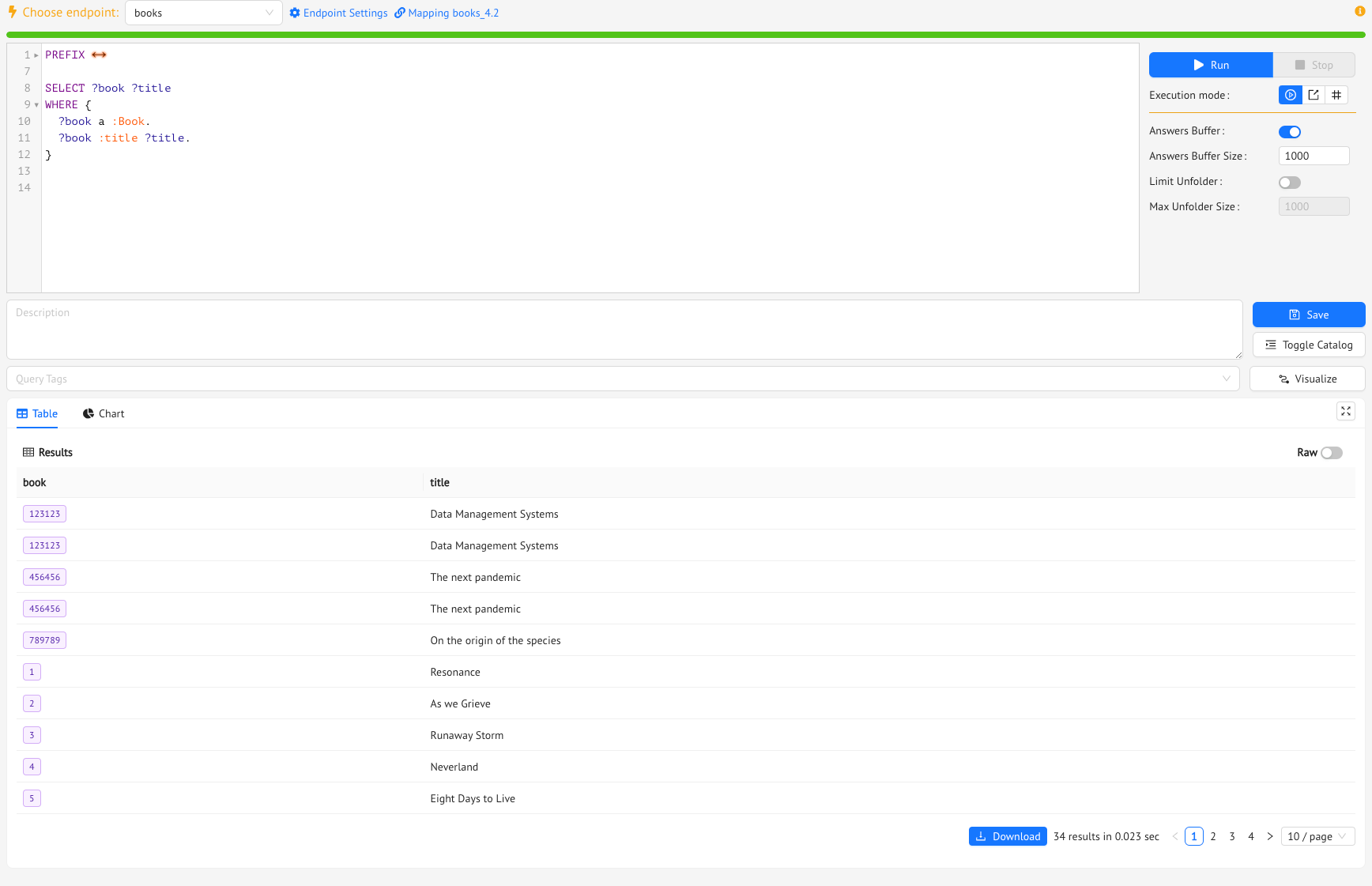
So, you are finally ready now to run some queries over the Books ontology.
From the Ontology Menu, click on the SPARQL link, and you’ll land on the Ontology SPARQL page, from where you’ll be able to manage and run your SPARQL queries.
The Mastro reasoner currently supports the SELECT and CONSTRUCT query forms.
Running a query in Monolith is fairly straightforward:
- Pick an endpoint (it has to be running on the ontology you are working with).
- Type in the SPARQL code of the query (to help you out, Monolith fills in the PREFIX section of the query for you), such as
SELECT ?book ?title
WHERE {
  ?book a :Book.
  ?book :title ?title.
}
to get all the books with their titles
- Press the Run button.
That’s it!
Your query is running, and you’ll start seeing the results in the table below the query.
Starting from version 2.0 of Monolith, the SPARQL endpoint allows you to choose between three query execution modes:
- Standard execution mode, which outputs the query results to Monolith’s interface, and which is coupled with an Answer Buffer to limit the number of produced results;
- File streaming mode, which streams the results directly to your chosen output file;
- Result count mode, which runs the query in background and produces the result count.
These execution modes are designed to help you whether you want to inspect a portion of the query results directly in your browser window, or you are querying large volumes of data and you want them streamed directly to a physical file.
Once the query is finished and you have the results, you can download them. You can choose between different export options for both the standard and the file streaming execution mode: The results will be downloaded in a CSV, JSON, XML, and PowerBI (.pbids) formats for SELECT queries, and RDF (TURTLE syntax) format for CONSTRUCT queries.
If your query is a CONSTRUCT query, then the results of the query will be a set of RDF triples, which can be exported to a Knowledge Graph (either to an existing one or to a new one).
The Query Catalog
You can save your most important queries for future re-execution in the Query Catalog by pressing the Store in Catalog button and providing an ID for each query.
Download this file and import it into the catalog by clicking on the Upload query catalog button. You will see a bunch of queries.
Clicking on any query in the catalog will open up a new query tab, from where you will be able to run the query.
Also, you can turn the Query Catalog on or off through the Toggle catalog button.
Finally, you can export your catalog by clicking on the Download query catalog button.
When you save a query to the Query Catalog, you can give it a description, and also assign one or more Query Tags to it. The query tagging system will help you easily classify and search the queries in your catalog. From the Settings Tab of the Settings section, you can add however many tags you like, assigning to each a name, a color, and (optionally) a description. You will notice that the dataquality tag is pre-defined in the system. This tag should be used to identify queries that represent user-defined business data integrity rules: so queries that in theory should not produce any answers (more on that in the Data Quality section).
Mastro SPARQL Support
Mastro supports (almost) all of SPARQL’s syntax. Specifically, in the table below, you can see which operators, functions, and query forms you can use to query the ontology through Mastro.
| Graph Patterns | BGP, FILTER, OPTIONAL, UNION |
| Negation | MINUS |
| Property Paths | INVERSEPATH, SEQUENCEPATH |
| Aggregates | COUNT, SUM, MIN, MAX, AVG, GROUP BY, HAVING |
| Subqueries | SUBQUERIES |
| Solution Sequences and Modifiers | ORDER BY, SELECT, *, DISTINCT, OFFSET, LIMIT |
| Query Forms | SELECT, CONSTRUCT |
| Functional Forms | ||, &&, =, !=, <, >, <=, >=, IN, NOT IN |
| Functions on Strings | SUBSTR, UCASE, LCASE, CONTAINS, CONCAT, REGEX, STRLEN, STRSTARTS, STRENDS, STRBEFORE, STRAFTER |
| Functions on Numerics | ROUND, CEIL, FLOOR |
| Functions on Dates and Times | NOW, YEAR, MONTH, DAY, HOURS, MINUTES, SECONDS |
Now that you know which SPARQL terms you can use, you need to know how to combine them. Here’s Mastro’s SPARQL Grammar (As in SPARQL’s official documentation, the EBNF notation used in the grammar is defined in Extensible Markup Language (XML) 1.1 [XML11] section 6 Notation):
ConstructQuery ::= ConstructClause `WHERE` ConstructBody
ConstructBody ::= (SelectQuery | UCQPattern)+
SelectQuery ::= SimpleSelect | SubSelect
SubSelect ::= SelectClause { SimpleSelect }
SimpleSelect ::= SelectClause WhereClause SolutionModifier
SelectClause ::= `SELECT` ( `DISTINCT`)? ( ( Var | ( ( Expression `AS` Var ) ) )+ | `*` )
Expression ::= `COUNT` ( `DISTINCT`? ( `*` | Var ) ) | `SUM` ( `DISTINCT`? Var ) | `MIN` ( `DISTINCT`? Var ) | `MAX` ( `DISTINCT`? Var ) | `AVG` ( `DISTINCT`? Var )
WhereClause ::= `WHERE` (UCQPattern | CQPattern)+
UCQPattern ::= CQPattern (`UNION` CQPattern)*
CQPattern ::= TriplesBlock OptionalGraphPattern* MinusGraphPattern? Filter*
TriplesBlock ::= Triple ( '.' TriplesBlock? )?
Triple ::= Term  IRI  Term
Term ::= Var | IRI
OptionalGraphPattern ::= `OPTIONAL` TriplesBlock Filter*
MinusGraphPattern  ::= `MINUS` TriplesBlock Filter*
Filter ::= `FILTER` Constraint (('||' | '&&') Constraint )*
Constraint ::= RelationalExpression
RelationalExpression ::= NumericExpression ( '=' NumericExpression | '!=' NumericExpression | '<' NumericExpression | '>' NumericExpression | '<=' NumericExpression | '>=' NumericExpression )?
NumericExpression ::= `INTEGER` | `DECIMAL` | `DOUBLE` | VariableExpression
SolutionModifier ::= GroupClause?  OrderClause? LimitOffsetClauses?
GroupClause ::= `GROUP BY` VariableExpression (`HAVING` VariableExpression)?
OrderClause ::= `ORDER BY` OrderCondition+
OrderCondition ::= ( ( `ASC` | `DESC` ) VariableExpression)
LimitOffsetClauses ::= LimitClause OffsetClause? | OffsetClause LimitClause?
LimitClause ::= `LIMIT` `INTEGER`
OffsetClause ::= `OFFSET` `INTEGER`
VariableExpression ::= Any expression built with a combination of variables, constants, IRI, functions, and aggregates
Ontology Reasoning
Activating (or deactivating) the Ontology Rewriting step of Mastro’s query answering process means that the axioms in the ontology will (or won’t) be considered when computing the results of the query.
Let’s see an example of how the Ontology Rewriting process can impact the results of the query.
Try running the all_books query from you Query Catalog.
You’ll see that the query will produce a total of 31 results, and also 9 Ontology Rewritings (you can see each of them from the Ontology Rewritings tab in the Query Report section). Each Ontology Rewriting is a new SPARQL query in which one axiom in the ontology has been used to reformulate the original query by replacing one ontology entity.
For instance, since :ClassicBook is a subclass of :Book, one of the rewritings of the query will be:
SELECT ?x0
WHERE { ?x0 a <http://www.obdasystems.com/books/Book>}
Now, try pressing the Reasoning toggle button to disable Mastro’s Ontology Reasoning step, and run the query again. You’ll see that the query now produces less results (only 27), and has just one rewriting, i.e., the original query.
Now, let’s try something different.
- Go to the Mappings page from the Ontology Menu, and from the Ontology Mappings tab, select the
:Bookclass, and delete its one and only mapping. - Restart the endpoint from the endpoint page.
- Then, go back to the SPARQL page, and try running the query again, with reasoning turned on.
You’ll see that you will get your 31 results back again, even if the :Book class doesn’t have any mappings now. These results have been produced by the SPARQL queries computed during the Ontology Reasoning step of Mastro’s process!
Finally, try running the same query again, but with Reasoning turned off. At this point, you shouldn’t be surprised to see that the query produces no results at all!
Previous Next