Entity Mappings
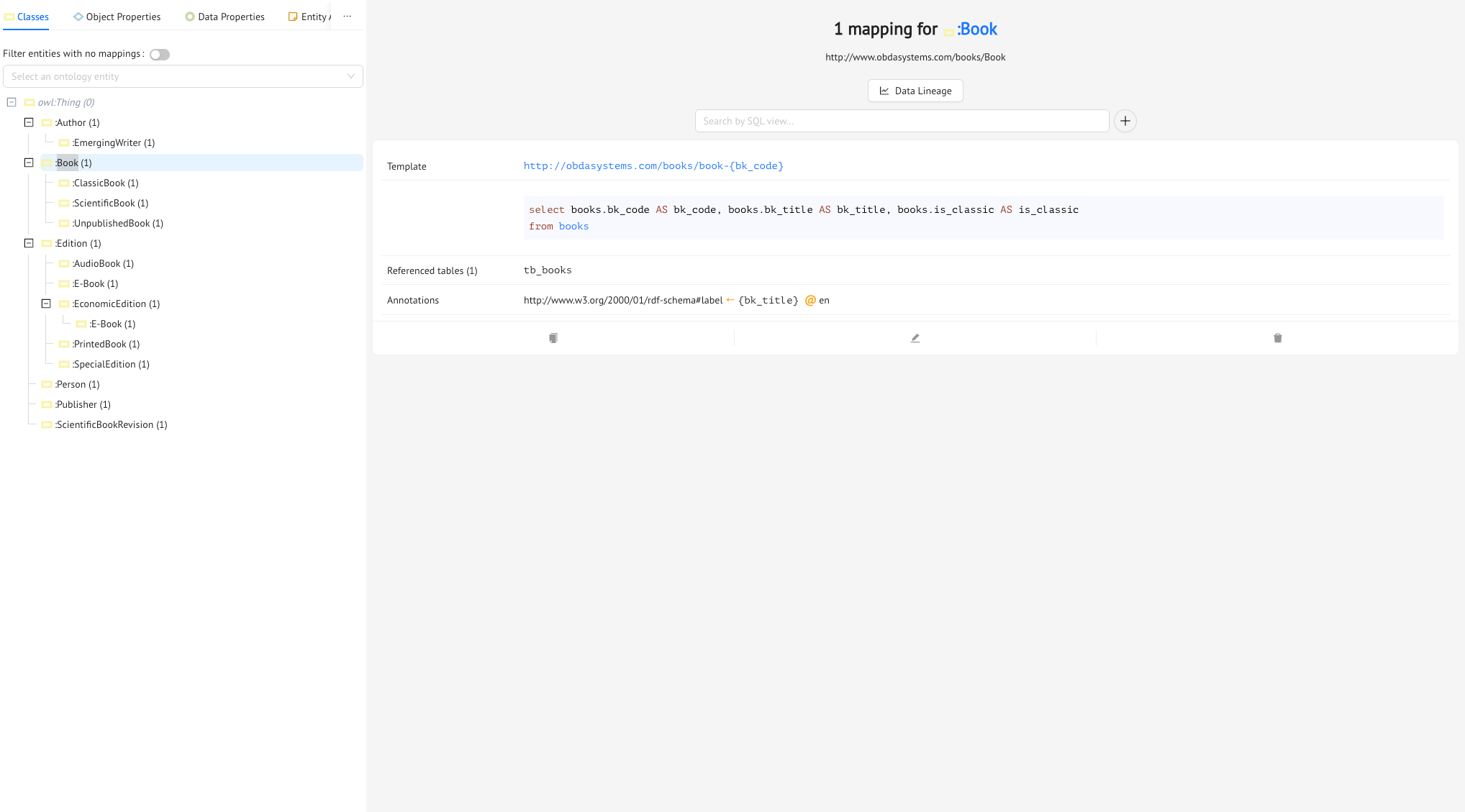
An Ontology Mapping is a link between an entity in the ontology and a conjunction of one or more SQL Views, possibly with some filters.
So an Ontology Mapping has basically three components:
-
one of the entities in the ontology (i.e., the head of the mapping)
- a select-project-join SQL query over the SQL Views (i.e., the body of the mapping).
In the SQL Query, when defining joins between different tables, Monolith requires to use explicit joins instead of implicit joins. So, for instance, useSELECT editions.ed_code AS ed_code, editions.ed_type AS ed_type, editions.pub_date AS pub_date, editions.n_edt AS n_edt, editions.editor AS editor, editions.bk_id AS bk_id, editions.e_book AS e_book, editions.price AS price FROM editions JOIN audio_book_editions on editions.ed_code = audio_book_editions.ed_codeinstead of
SELECT editions.ed_code AS ed_code, editions.ed_type AS ed_type, editions.pub_date AS pub_date, editions.n_edt AS n_edt, editions.editor AS editor, editions.bk_id AS bk_id, editions.e_book AS e_book, editions.price AS price FROM editions, audio_book_editions WHERE editions.ed_code = audio_book_editions.ed_code - an IRI template, which is formed by a fixed part and one or more template variables, between braces i.e.
http://obdasystems.com/books/book-{code}
In Monolith, Ontology Mappings are organized either graphically or by the entity which they map (the Entity Mappings submenu of the Mapping tab), or by their ID (the All Mappings submenu).
Let’s see an example. From the Mappings tab, go to the Entity Mappings submenu, and select the
:ClassicBookclass. You’ll see that it has one mapping, in which the SQL query over the views isselect books.bk_code AS bk_code, books.bk_title AS bk_title, books.is_classic AS is_classic from books where books.is_classic = 1
This is because, as we saw earlier, in the tb_books table the classic books are tagged with 1.
Finally, the IRI template is:
http://www.obdasystems.com/books/book-{bk_code}
So http://www.obdasystems.com/books/book- is the fixed part of the IRI template, and {bk_code} is the template variable.
This means that instances of the Classic Books class are built using the IRI template http://obdasystems.com/books/book-{bk_code}, and extracting the codes from the books view, but, again, only for those books for which the field is_classic is 1.
Creating an Ontology Mapping
Now let’s try defining an Ontology Mapping using the SQL View you just created. Go to the Mapping tab, then the Entity Mappings submenu, and click on the object property :hasEdition from the object property tree.
There obviously aren’t any mappings yet, so you can create the first one. Click on the Add Mapping button, and the Ontology Mapping Editor drawer will pop out.
You’ll see that the Entity has been filled out for you (but you can pick a new one if you change your mind). So you have to define the SQL code of the mapping, and the two templates (:hasEdition is an object property, so you have to build the instances of both the domain classes and the range classes, which are, respectively, :Book and :Edition).
Before you start typing in the SQL code, try pressing the Help button. You will be shown the SQL Views, templates, and prefixes that are already defined in the Mapping, which will help you define a correct Ontology Mapping.
As we discussed earlier, the SQL code in an Ontology Mapping is a select-project-join SQL query over the SQL Views in the Mapping.
So you will need to define the SELECT, FROM, and WHERE components of the SQL query.
In the SELECT component, you’ll need to include all fields in edition_view which you will use in the templates for the domain and range of the object property. In this case, you’ll want to use code to build the instances of :Edition, and bk_id to build the instances of :Book. It’s also always a good idea to use aliases, to make the templates a little shorter (if not, Monolith will do it for you). So:
select
  editions.ed_code AS ed_code,
  editions.bk_id AS bk_id
from editions
In the FROM component, you can include one or more SQL Views, and join them using equi-joins. In this case, you will only need edition_view, but in the more general case, assuming you have two views such as V1(x1,x2,x3) and V2(y1,y2,y3) and you want to join them on x1 = y1 and x2 = y2, you can write something like this:
FROM V1 JOIN V2 ON V1.x1 = V2.y1 AND V1.x2 = V2.y2
Lastly, you can define the WHERE component, in which you can use the following predicates to impose conditions on the results that will be extracted from the SQL Views: AND, >=, <=, <>, >, <, =, IS NULL, IS NOT NULL, IN, NOT IN, NOT LIKE, LIKE. For this mapping, you don’t have to impose any condition on the edition_view.code and edition_view.bk_id fields, because both ed_code and bk_id in the tb_edition table are not nullable, and you aren’t looking for any particolar conditions on the ID codes to create the instances of the classes :Edition and :Book. So your final SQL code for the Ontology Mapping of :hasEdition will be:
select
  editions.ed_code AS ed_code,
  editions.bk_id AS bk_id
from editions
The only thing missing now are the templates.
When defining templates in a Mapping, the most important thing to remember is to be consistent. Pick a template for a class, and stick to it whenever possible.
In this case, you can use (for example) http://obdasystems.com/books/book-{bk_id} for the domain template, and http://obdasystems.com/books/edition-{ed_code}. Remember to use the + button to automatically add the template variables (between braces {}) in the template.
Previous Next